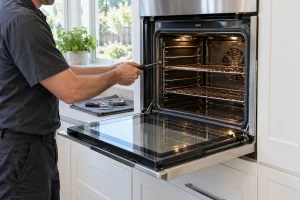
Wall Oven Repair in San Francisco
Repair for Electrolux single and microwave-combination wall ovens in San Francisco and the Bay Area, covering heat, fans, door latches and displays.

Specialized Electrolux Appliance Repair in San Francisco
Mon–Sat: 8:00 AM – 7:00 PM
Built into cabinetry, wired directly to the house. Here is what separates the single oven from the microwave combination and how to check either one.
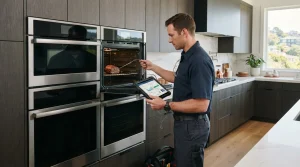
A wall oven is built into a cabinet tower at about chest height, which is why homeowners like it and why it repairs differently from a freestanding range. Nothing slides out for easy access. The oven is wired into the house circuit, framed by trim and often paired with a cooktop somewhere else on the counter. A technician works with the cabinet around the oven in mind from the very first minute.
All three models in our Electrolux wall oven group are electric and 30 inches wide. They split into two layouts.
In the model number, ECWS stands for the single oven and ECWM for the combination. Knowing which one you own matters because the combination has two separate cooking systems behind one front.
Open the oven door fully and look along the oven frame; the label is usually printed there, sometimes on the side of the opening. On a combination, check around the microwave door too. Photograph it so the characters are readable.
If your cookies brown unevenly or a roast takes a very different time than before, the control may be misreading the cavity temperature, or a heating element or the door seal may be weakening. Compare notes with our article on oven temperature swings while baking.
A cooling fan is part of normal operation after cooking. It should stop once the cavity has cooled. If it runs long after use, read the oven cooling fan that keeps running.
A lock motor that is still engaged shows up as a door that will not open. Wait for the oven to cool, then check the lock setting on the display before concluding anything is stuck.
On a combination, a microwave that runs but leaves food cold is a different path from a failed oven. Our microwave that runs but does not heat article applies to the microwave half of the diagnosis.
No display with a working breaker suggests the control, a connection, or a protective cut-out. A technician tests the supply at the proper point before touching a part.
If the display shows a code, write down every character before turning anything off. The error code library lists meanings we have verified for the codes in our collection. Use it to understand what the oven noticed, then describe it to us when you book.
Do not take the oven out of its cutout, open the rear cover, or test wiring with a meter. If you notice a burning smell or sparks, switch off at the breaker and keep the door shut.
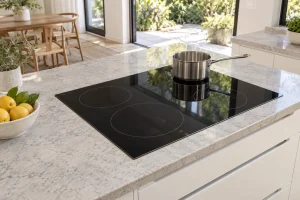
We start by asking which oven it is, what the cabinet looks like and whether the oven can be reached without moving the cooktop or trim. After checks and diagnosis you get a written estimate. We do nothing until you say yes. If your oven pairs with a cooktop on the counter, you may also want to read about Electrolux cooktops.
To arrange service, use Electrolux wall oven repair. If you cook mostly on a stove rather than a built-in, the range guide may fit better.
The ECWS3012AS single oven and the ECWM3011AS and ECWM3012AS microwave combinations, all 30 inch and electric.
Yes. A combination has a microwave door with its own controls; a single oven has one cavity only.
A fan alone is not a safety problem. If the oven also smells burnt or the breaker trips, stop using it.
Only when the diagnosis requires it, and we explain the reason in the written estimate first.
A clear path to the kitchen, an empty oven, the model photo and a note on when the problem appears.
Repair for Electrolux single and microwave-combination wall ovens in San Francisco and the Bay Area, covering heat, fans, door latches and displays.
Repair for the Electrolux ECWM3011AS, a 30-inch electric wall oven with a microwave combination, in San Francisco and around the Bay Area.
Electrolux ECWM3012AS repair in San Francisco: a 30-inch electric wall oven with microwave, tested in your home with a written estimate before…
Electrolux ECWS3012AS single wall oven repair in San Francisco and the Bay Area, including the Air Sous Vide series, with a written…
Electrolux cooktops include induction models in 30 and 36 inches and a 36-inch gas model. See the lineup, common complaints, codes and…
Electrolux dishwashers come in 24-inch and 18-inch widths, including the ICON line. See the lineup, where the label sits and what to…
Electrolux electric and gas dryers by series, where to find the label, display codes and the venting checks that fix many complaints…
What to know about Electrolux built-in freezers in San Francisco homes: reading the label, the frost and warm-up complaints we see, and…
How Electrolux ice makers work in refrigerators and built-in units, the symptoms owners report, and what to check at the water line,…
A laundry tower puts a washer and a dryer in one stacked cabinet. Here is how the Electrolux tower lineup is organized…
Electrolux built-in microwaves open either as a drop-down drawer door or a side swing. Check the lineup, label spot and safe first…
Electrolux ranges combine an oven and a cooktop in one 30- or 36-inch body, as induction or dual fuel. See the lineup,…
French-door, column and drawer refrigeration from Electrolux, with notes on model labels, display codes and what to check before booking a visit…
Electrolux front-load and top-load washers by series, where the label is, the display codes and safe checks before you book a repair.
A guide to Electrolux under-counter wine and beverage coolers: where the label sits, why temperature drifts, what you can check and when…
Share a few details and we’ll confirm an appointment. Prefer to talk? Call us and we’ll help right away.