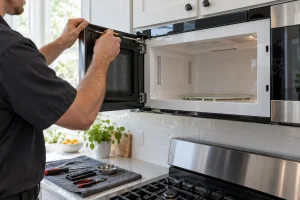
Microwave Repair in San Francisco
Repair for Electrolux built-in drawer and side-swing microwaves in San Francisco and the Bay Area, covering no heat, door latches and display…

Specialized Electrolux Appliance Repair in San Francisco
Mon–Sat: 8:00 AM – 7:00 PM
Trimmed into cabinetry with a drop-down door or a side swing. Find your model and see what is safe for you to check.
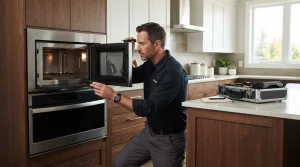
A built-in microwave lives inside cabinetry, often right above or beside a wall oven, framed by trim kits and filler panels. It is not a countertop appliance you can swap in a minute. For that reason a microwave problem usually becomes a question about fit, venting and access as well as about what failed.
All the models we list are 30-inch built-ins, and they differ in how the door opens.
The model prefix EMB means built-in microwave; the next letter, D or S, tells you how the door moves. Door style matters for diagnosis, because a latch that fails to catch on a drop-down door and one that fails on a side swing involve different hardware, and we want to look in the right place first.
On the drop-down style, the label is usually behind the drawer front or along its edge; on a side swing, look on the frame when the door is open. If trim hides it, a photograph of the control panel and door style helps us work backward.
The microwave will not run unless its door switches are satisfied. If a door does not close firmly, the oven acts as if it were open. Read microwave door won’t latch for what to look at.
The fan, light and turntable can all work while the heating system does not. We explain the possibilities in microwave runs but does not heat. Do not open the cabinet to look; the parts inside hold energy even when unplugged.
A door that no longer meets the frame evenly can keep the switches from registering. In a built-in the cause may be the hinge area, the trim kit or the cutout itself, and only an in-person look tells which.
Noise from the fan or the door can be harmless. A burning odor is not. Stop and cut power at the breaker.
Some codes are about the microwave protecting itself, not about a failed part.
More are in the error code library. A thermal code often follows a blocked vent or heavy repeated use, so let the unit cool before judging it.
Built-in microwaves sit in a trim kit that sets the gap around the cabinet. Ventilation space around the unit matters, so when you book, tell us if the trim has been modified, if the microwave shares a tower with a wall oven, and how the power is supplied. Those details decide whether we can work from the front or need to loosen the surround.
Never remove the outer cover. The inside holds a high-voltage section that can hurt you even when the oven is off. With burning smell or sparks, switch off at the breaker and leave the door closed.
Describe the door style and whether the microwave sits beside a wall oven. We diagnose first, provide a written estimate, and do nothing until you approve. See Electrolux microwave repair for the full visit outline, and Electrolux wall ovens if the microwave is part of an oven stack.
The EMBD3010AS drop-down model and the EMBS2411AB and EMBS2411BB side-swing models, all 30-inch built-ins.
Running empty can stress the heating system. Always have a cup of water inside when testing.
It can restrict ventilation or hold the door out of alignment. A technician checks the fit during the visit.
Not always. Let steam clear and wipe the panel. If the code returns, book a visit.
Only if it starts normally, the door closes firmly and there is no smell or sparking.
Repair for Electrolux built-in drawer and side-swing microwaves in San Francisco and the Bay Area, covering no heat, door latches and display…
Electrolux EMBD3010AS built-in microwave with a drop-down door: repair in San Francisco and the Bay Area, diagnosed first, with a written estimate.
Electrolux EMBS2411AB side-swing built-in microwave repair in San Francisco and around the Bay Area, with diagnosis and a written estimate before any…
Electrolux EMBS2411BB built-in microwave with a side-swing door: repair for San Francisco and Bay Area kitchens, with a written estimate before any…
Electrolux cooktops include induction models in 30 and 36 inches and a 36-inch gas model. See the lineup, common complaints, codes and…
Electrolux dishwashers come in 24-inch and 18-inch widths, including the ICON line. See the lineup, where the label sits and what to…
Electrolux electric and gas dryers by series, where to find the label, display codes and the venting checks that fix many complaints…
What to know about Electrolux built-in freezers in San Francisco homes: reading the label, the frost and warm-up complaints we see, and…
How Electrolux ice makers work in refrigerators and built-in units, the symptoms owners report, and what to check at the water line,…
A laundry tower puts a washer and a dryer in one stacked cabinet. Here is how the Electrolux tower lineup is organized…
Electrolux ranges combine an oven and a cooktop in one 30- or 36-inch body, as induction or dual fuel. See the lineup,…
French-door, column and drawer refrigeration from Electrolux, with notes on model labels, display codes and what to check before booking a visit…
Electrolux 30-inch electric wall ovens come as a single oven or a microwave combination stacked in one cabinet. Learn the models, label…
Electrolux front-load and top-load washers by series, where the label is, the display codes and safe checks before you book a repair.
A guide to Electrolux under-counter wine and beverage coolers: where the label sits, why temperature drifts, what you can check and when…
Share a few details and we’ll confirm an appointment. Prefer to talk? Call us and we’ll help right away.